Deliverability tests
Deliverability tests
Deliverability tests give QA, release, and operations teams a pass/fail view of whether the right messages reached the right inboxes or phone numbers during a launch, canary, or campaign run. They are designed for higher-level verification than a single wait call in one test.
When to use this feature
Use deliverability tests when you need to answer questions like:
- Did every selected inbox receive the expected email volume?
- Did every selected phone number receive the expected SMS?
- Did messages arrive from the expected sender?
- Did the campaign subject line or recipient matching logic behave the way we intended?
If you only need to wait for one message in one test, use Wait for methods instead.
Typical workflow
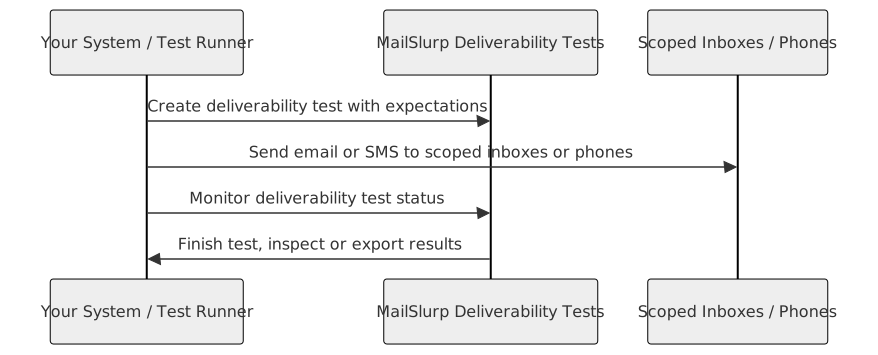
- Create a test with the right scope, selector, and expectations.
- Start the test manually or from its schedule.
- Trigger traffic from your app, ESP, or release workflow.
- Poll status and review pass/fail results as messages arrive.
- Investigate unmatched inboxes or phone numbers before scaling up the send.
Example: create an inbox-scoped test
Loading...Example: start a test run
Loading...Scope and selector choices
You run a deliverability test in one scope at a time:
- Inbox scope for inbound email delivery
- Phone scope for inbound SMS delivery
Selectors determine which entities participate:
- all entities in scope
- explicit entity lists
- pattern-based selection when you want a naming or addressing convention to define the cohort
Start with a canary cohort before you widen the selector.
What you can validate
Deliverability tests are strongest when you care about expectation-based delivery signals such as:
- minimum message counts
- sender matching
- recipient matching
- subject matching
They are not a replacement for deeper content review. Pair them with:
- Email audit for link and image checks
- Device previews for rendering review
- Campaign Probe for live campaign capture
Progress and results
During execution you can review:
- completion percentage
- matched versus unmatched entities
- run state such as scheduled, running, paused, completed, failed, or stopped
Example: check for completion
Loading...Example: fetch test results
Loading...Use unmatched-only views first when triaging failures. That is the fastest way to find which inboxes or phone numbers missed expectations.
Recommended operating model
- Define a small cohort and strict expectations.
- Verify sender and subject filters before launch.
- Expand the test to the broader release or campaign segment.
- Pair the results with monitoring if the send will continue after launch.